An offline Overleaf alternative that compiles on your Mac
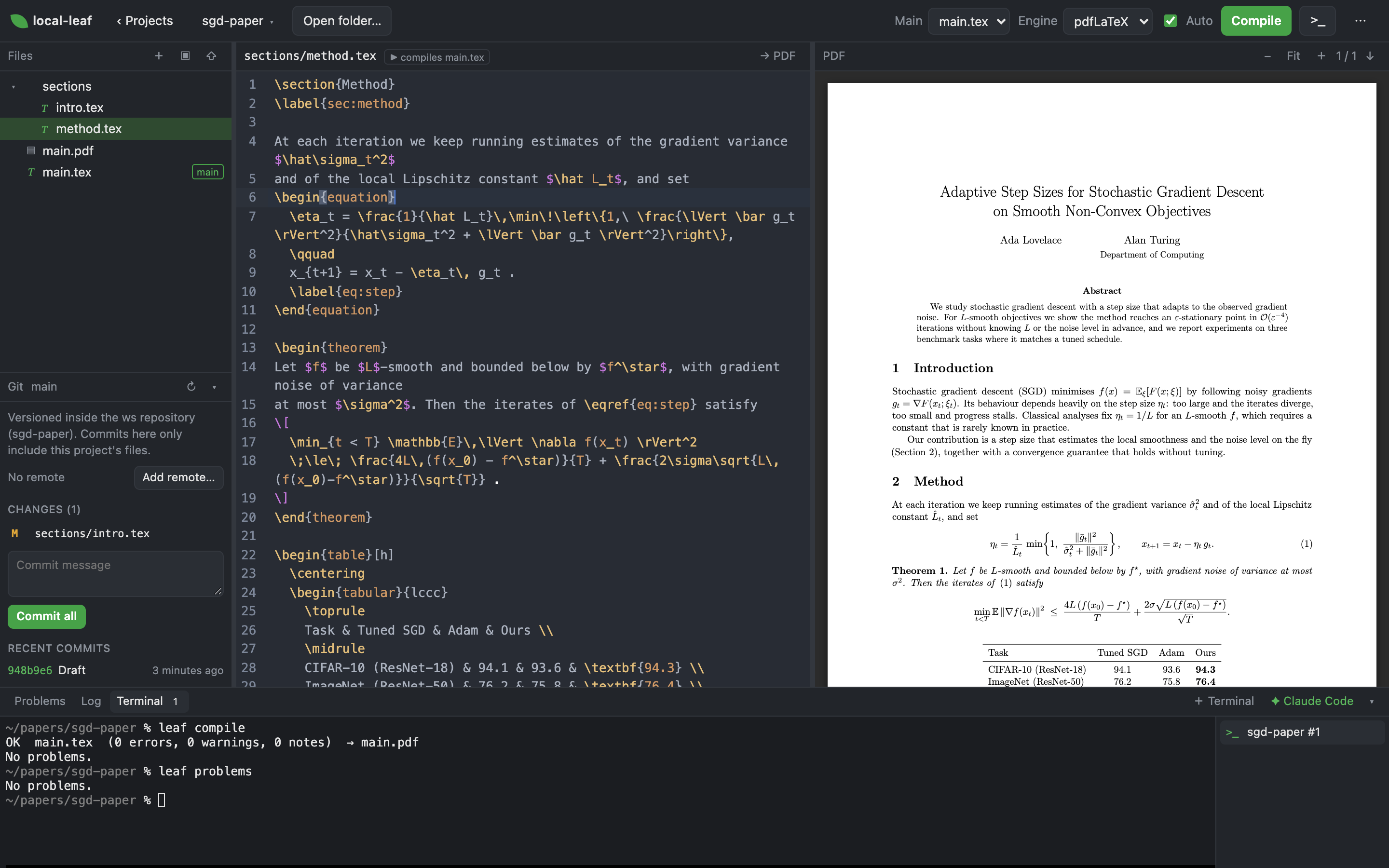
local-leaf is a LaTeX editor that looks and works like Overleaf but runs on your own machine and compiles with the TeX you already have. Live PDF, SyncTeX both ways, Overleaf import, and Git built in. No account, no upload, no compile timeout.
$ git clone https://github.com/aneesh-iyer29/local-leaf
$ cd local-leaf && npm install && npm startleaf CLI.Everything you use in Overleaf, on your own disk
Point local-leaf at a folder of .tex files. It never copies or uploads them, so any other tool can work on the same project while the editor follows along.
Live PDF with SyncTeX
pdf.js preview that jumps both ways: ⌘⇧J from source to PDF, ⌘-click from PDF to source. Auto-compiles when a file changes on disk.
Your TeX, no limits
latexmk with pdfLaTeX, XeLaTeX or LuaLaTeX from MacTeX. No compile timeout, and errors come back parsed with file and line.
Import from Overleaf
Bring a project over from a downloaded .zip on any plan, or straight from Overleaf's git URL on a paid one.
Git in the sidebar
Commit, push, pull, or publish a project to GitHub without leaving the editor. Keep your papers in a private repo.
Terminal and Claude Code
A VS Code-style terminal opens in the project folder, with a one-click Claude Code launcher for help on the document.
Overleaf's shortcuts
⌘B, ⌘I, ⌘E, ⌘⇧M, ⌘/ and the rest work as they do in Overleaf, with completions for commands, \ref labels and \cite keys.
local-leaf compared with Overleaf
Same way of working, different place. Here is what changes when the editor lives on your Mac.
| Overleaf (overleaf.com) | local-leaf | |
|---|---|---|
| Where your files live | Overleaf's servers | A folder on your Mac |
| What compiles them | Overleaf's TeX Live, with a compile time limit | Your own TeX distribution, no time limit |
| Works offline | No | Yes |
| Git and GitHub | Git access and GitHub sync on paid plans | Commit, push, pull and publish from the sidebar, free |
| AI agents and scripts | Browser only | leaf CLI and an integrated terminal with Claude Code |
| Real-time collaboration | Yes | No: one user, share through git |
| Price | Free tier and paid plans | Free, MIT licensed |
Other options: Overleaf Community Edition is the full multi-user server you self-host with Docker; local-leaf is one Node process with no Docker and no accounts. VS Code with LaTeX Workshop suits people who live in VS Code; local-leaf keeps Overleaf's layout and shortcuts in a browser tab.
Write with Claude Code, Codex, or any terminal agent
Because the project is a plain folder, an AI coding agent can edit your paper directly while you watch the source and PDF update live. The leaf CLI gives it the same view of the editor you have.
# the loop an agent runs, from AGENTS.md
$ leaf open thesis        # open a project by name
$ leaf root               # where to edit files
$ leaf compile            # build, wait, exit 1 on failure
OK  main.tex  (0 errors, 0 warnings, 0 notes)  → main.pdf
$ leaf problems --errors  # errors with file:line
$ leaf synctex main.tex:42
$ leaf git commit -m "Tighten the proof"- One click: the terminal panel's ✦ Claude Code button starts
claudein the open project. - Any agent:
AGENTS.mdteaches Codex, Cursor, Gemini CLI and others the edit → compile → fix loop;CLAUDE.mdimports it. - Machine-readable: every
leafcommand accepts--json, andleaf eventsstreams file and compile events. - Nothing hidden: the agent's edits land in the same files the editor shows, so you review them as they happen and commit from the Git panel.
Quick start
local-leaf runs from source. It opens in your browser at http://localhost:3737 and binds to localhost only.
$ git clone https://github.com/aneesh-iyer29/local-leaf
$ cd local-leaf
$ npm install
$ npm start                 # opens the editor
$ npm link # puts `leaf` on your PATH- macOS with a TeX distribution that provides
latexmkandsynctex. MacTeX puts them in/Library/TeX/texbin. - Node.js 18 or newer.
- Projects live in one workspace folder; point it at a private git repo with
leaf workspace <path>to version your papers separately.
FAQ
Is there an offline version of Overleaf?
Overleaf itself needs a connection, and its self-hosted Community Edition needs Docker. local-leaf gives you an Overleaf-style editor (file tree, source, live PDF, SyncTeX, the same shortcuts) that runs entirely on your Mac and compiles with MacTeX, so it works on a plane.
How do I move a project from Overleaf to my Mac?
In Overleaf use Menu → Download → Source, then Upload .zip… in local-leaf. On a paid Overleaf plan you can instead paste the project URL into Import from Overleaf… and it is cloned over git.
Can Claude Code or another AI agent edit my LaTeX paper?
Yes, and you watch it happen. Press ✦ Claude Code in the terminal panel, or run any agent in the project folder. It edits the .tex files, runs leaf compile, reads leaf problems for errors with file and line, and the editor and PDF update live.
Which TeX engines and bibliography tools work?
pdfLaTeX, XeLaTeX and LuaLaTeX through latexmk, which also runs BibTeX or Biber when your document needs them. \cite completions come from the .bib files in the project.
Does it support real-time collaboration?
No. local-leaf is a single-user tool. Share work through git: every project can be committed and pushed from the sidebar.
Does it run on Windows or Linux?
It is macOS-first today. The server is plain Node, so small portability patches are welcome.
Can other people reach my editor?
No. The server binds to 127.0.0.1 only and should never be exposed to other machines, since it can read files and run a shell as you.
Keep your papers on your own Mac
local-leaf is free and MIT-licensed. If it saves you from a compile timeout, a star on GitHub helps other LaTeX writers find it.